
Backlinks
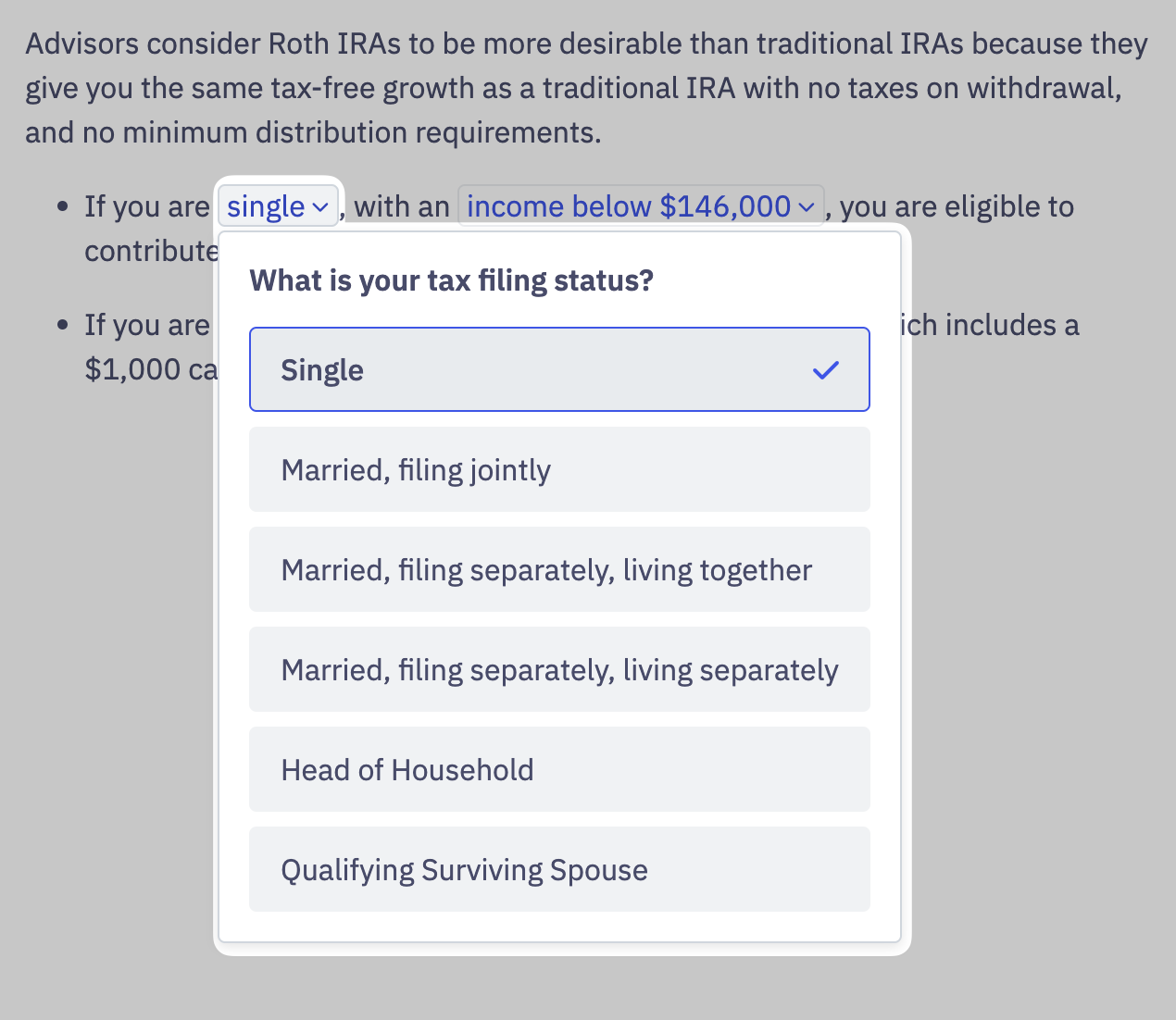
A Backlink connects a Variable in the advice text to the question or assumption that produced it. In the rendered UI, the Backlink shows up as a chip — see Taffrail's User Experience for the visual pattern. Pressing the chip opens the underlying question and lets the reader change the answer.
In the example below, pressing the chip containing "single" opens the Backlinked tax filing status question and the available choices.
Embed
The Advice Embed ships with the chip-and-popup interface built in. We style it to match your brand.
API
Backlinks are detectable in any Advice Content Type by inspecting the inline Taffrail Vars or the Variables list on the response.
A Variable with a Backlink carries data-backlink-required="true" on the <taffrail-var> element, plus a data-backlink-name attribute that names the originating question:
{
  "headline_html": "...your income is below <a href=\"#IRS_Limit\" class=\"taffrail-var\"><taffrail-var data-variable-name=\"IRS_Limit\" data-backlink-name=\"Annual_Income\" data-backlink-required=\"true\" data-variable-raw-value=\"146000\">$146,000</taffrail-var></a>..."
}
Learn more in the API Reference.
Updated 5 months ago